Grail and Game Engines
Grail and Unity
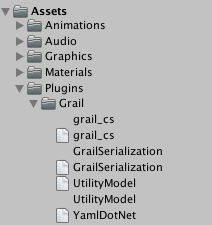
To make use of grail you must simply drop the grail_cs.dll in Assets/Plugins/ directory inside your project directory.
If you would also like to use Grail configuration files (produced by our graphical tools), you will also need to place GrailSerialization.dll UtilityModel.dll and third-party tool library - YamlDotNet.dll.
After doing so Unity will create .meta files for libraries and you will be able to use Grail’s sources in your code.
Grail and UE4
Unreal integration is a little bit more convoluted, but not very much so.
-
First, place grail binaries and headers in any directory inside your project. For purposes of this tutorial, we assume that they’re located in
ThirdParty/graildirectory. -
Open the
Source/Your_Project_Name/Your_Project_Name.Build.csfile -
Modify it in the following way:
using UnrealBuildTool; using System.IO; public class Babel : ModuleRules { private string ThirdPartyPath { get { return Path.GetFullPath(Path.Combine(ModuleDirectory, "../../ThirdParty/")); } } public Babel(ReadOnlyTargetRules Target) : base(Target) { ///... your standard UE build system settings ... //Add these lines PublicAdditionalLibraries.Add(Path.Combine(ThirdPartyPath, "grail/lib/grail.lib")); PublicIncludePaths.Add(Path.Combine(ThirdPartyPath, "grail/include/")); bUseRTTI = true; } } -
Generate Visual Studio project files and voila!